Designing a terminal ui
June 2025
I led the design of our terminal ui from 0 → 1: the screen engineers watch while the code is being generated and executed, which, for a full integration, can take up to 8 hours.
Context
*codeplain turns natural-language specs into production software, no human in the loop. We just announced a $3M seed round.
The problem
Internally, code generation runs as one large state-machine graph. Engineers never saw it, and if they could have, it would be hard to understand.
My job was to turn this into something a developer could read at a glance, an interface that gave real visibility into the codegen system without handing them the graph.
>How do you make a long-running, state-machine-driven AI system understandable for engineers, without exposing all of this?
Main three developer questions
We beta launched *codeplain in Feb 2026 at a ***plain dev day event that I organized for 50 hand-picked engineers in the region, who installed and ran *codeplain for the first time.
beta launch at ***plain dev day for 50 hand-picked engineers
Developers checked in about once an hour and wanted answers to three questions fast:
- Where am I?
- What comes next?
- Is something broken?
The status screen answers all three in a single top-to-bottom scan.
The status screen
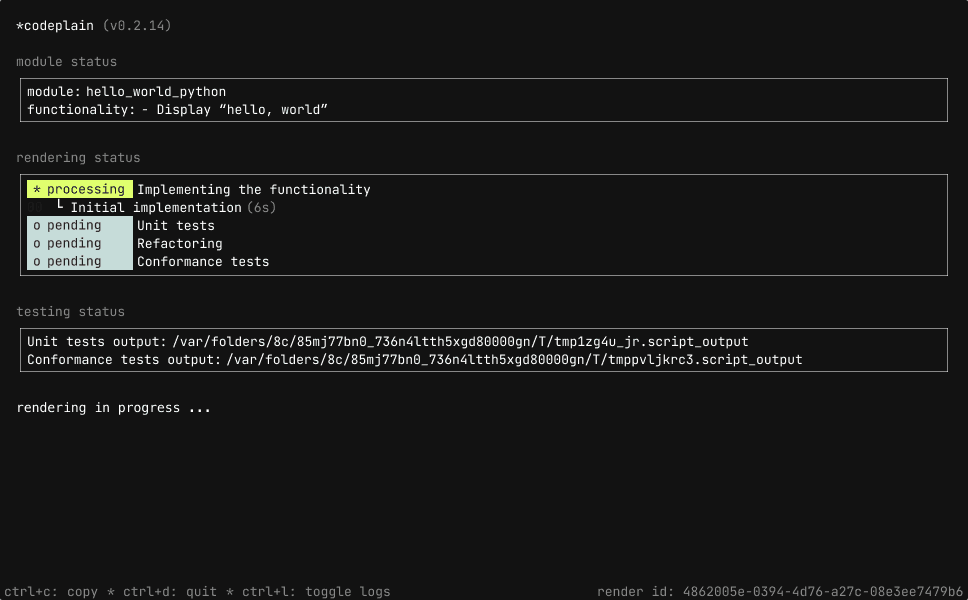
The home of the tool, and the first thing engineers see during a render. Three components, each answering one question, in a single top-to-bottom scan.
where am i → module status
Shows which module (or file) and functionality is rendering right now.
what comes next → rendering status
I defined the four-phase pipeline:
- Implementing
- Unit tests
- Refactoring
- Conformance tests
I used four phases instead of a progress bar on purpose. A progress bar implies uniform, linear work, and code generation isn't: the model can fly through implementation in seconds, then spend minutes fixing one failing conformance test.
The pipeline tells an engineer which kind of work is happening and how long it's been stuck there, which is what lets them decide whether to intervene.
Each row has a status badge, the phase name, and an indented substate with an elapsed timer. The timer doubles as a smell detector; eight minutes on a simple fix means something's looping.
At ***plain dev day, the per-step timer wasn't enough on its own:
"That timer says 30s, but the process is already taking 20 minutes."
I implemented the total progress of current rendering and how credits are being used. Because our pricing plan is 1 rendering credit = 1 functionality, I wanted to establish this mental model in the user.
is something broken → testing status
Paths to the latest unit and conformance test output, plus environment errors written to be agent-actionable, the exact script path, the missing package, the install command.
"The user should be made aware of the environment issues, such as libraries, api keys, etc."
I noticed engineers don't read these errors; they paste them into Claude Code and let the agent fix them. So I wrote the error message to be the interface.
Beyond the status screen
The status screen answers everything about reading a render. These features are about controlling it.
Pause and resume
"It's a major UX failure that I cannot pause code generation when I leave my office and resume it when I come home."
Ctrl+P pauses a render. I chose it over esc or space because those get pressed constantly in a terminal, and a render this long shouldn't be pausable by accident.
Partial rendering
One of the most-requested features from the beta event at ***plain dev day. When re-running *codeplain on a module that has been previously rendered, detect what changed and offer to resume from the right checkpoint instead of re-rendering everything from scratch.
"I have to look through the modules to figure out where it stopped. It would be very beneficial if it just offered to generate from where it last finished."
Logs ctrl+l
The dashboard answers "where am I and is anything broken." The log view answers "why." The whole screen switches between them and they're mutually exclusive.
A scrollable stream, filterable by DEBUG / INFO / WARNING / ERROR. Familiar to developers, it built trust by showing the history behind the current state.
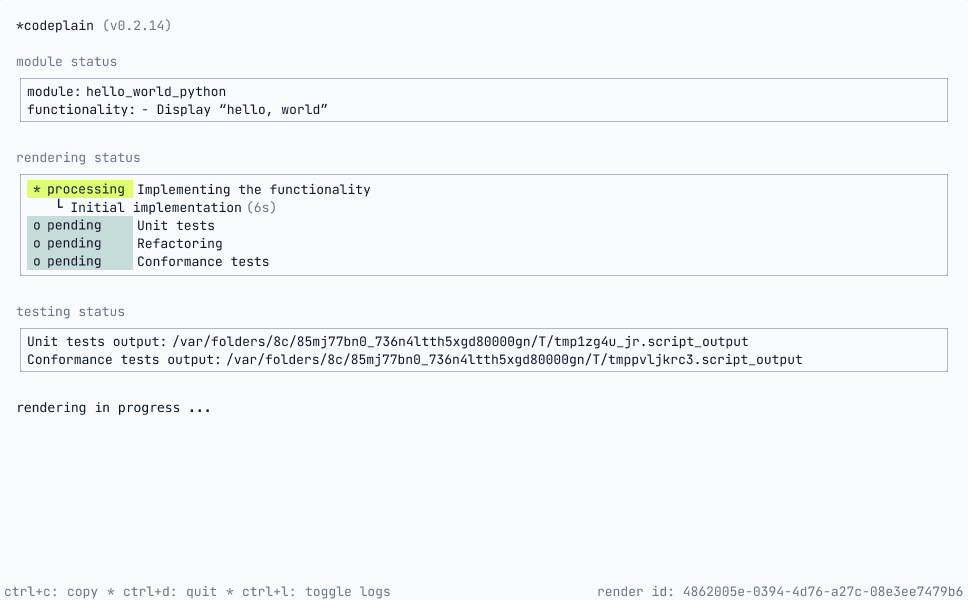
Light and dark
Every developer has a personalized terminal and our TUI didn't respect their theme.
I added light to the existing dark, set via env variable (CODEPLAIN_THEME=light) over a keyboard toggle, since the theme is a set-once preference, not a mid-render decision.
How I prototyped and shipped features
Research & inspiration
I got most of my ideas on CLI design from Amanda Pinsker's GitHub CLI Config talk. I cold-emailed her and she walked me through prototypes she'd made for GitHub Actions.
Prototyping in the medium
One of our design partners built a rough split-pane TUI to show what was missing. From that screenshot I extracted the underlying state machine, then prototyped directly in the terminal using Claude Code so engineers could react to a running prototype rather than read a spec.
Designing the language
In a terminal, language is an important part of the interface. I used google docs and sheets to work with my team to decide how we wanted to talk to our usersadd:
1. Google Doc: black background and monospace font to write and feel the terminal output, exactly as engineers would read it.
2. Google Sheet: mapping every state and substate the user could see: main states, substates, success and error conditions, and the reason behind each. This became the source of truth for what the TUI communicated at every point in the render.
From prototype to shipped
I didn't stop at prototypes. I shipped features directly into the product. my commits in the codeplain repo →
Results
From design partners to customers.
We worked with three design partners (DevRev, HYCU, and Incode) through early development. All three converted to paying customers using *codeplain to ship real integrations. I wrote a blog post on how DevRev uses *codeplain →
A weekly feedback loop.
The ***plain dev day event surfaced problems our experienced partners had routed around, and several became the features above: partial rendering, sharper environment errors, theme support. I now lead a weekly user-testing session, paced to what I can fix before the next one.
Developer adoption on hackathons.
I organized a hackathon in Ljubljana for 40 developers to get feedback on the onboarding flow from first-time users. The core challenge: a developer needs an “aha” moment early to keep using the product and recommend it to their team.
We also sponsored a hackathon in London where 100 developers adopted our technology. Next up: WeAreDevelopers conference in July, where we're leading a workshop in front of our target audience.
I also presented *codeplain to computer science students at the University of Ljubljana and to Klub Ada, the women-in-tech community.
What I'd change
- Push for TypeScript sooner; Python limited the terminal's visual flexibility in ways that only became clear later.
- Surface the count of failed test attempts earlier; we hid it assuming it'd discourage; users found it actionable.
- The biggest thing testing taught me is that the tool points engineers at the wrong target. At *plain dev day, 95% of users didn't touch the spec, they only wanted to see the technology run, and the feedback was consistent: "in the TUI everything is about rendering, there's very little about specs." I'd shift the focus sooner from explaining the renderer to actively helping users write better specs.
test the ui live by installing *codeplain on macOS and Linux
curl -fsSL https://codeplain.ai/install.sh | bash